SENARYSTUDIOS

A home screen for Android

Senary
Launcher

A replacement home screen. Most things within reach of one thumb, and more to customise than stock Android.

On Google Play since 23 September 2026. Android 14 and later.

See it

Taken on a phone, with a real calendar and live weather.

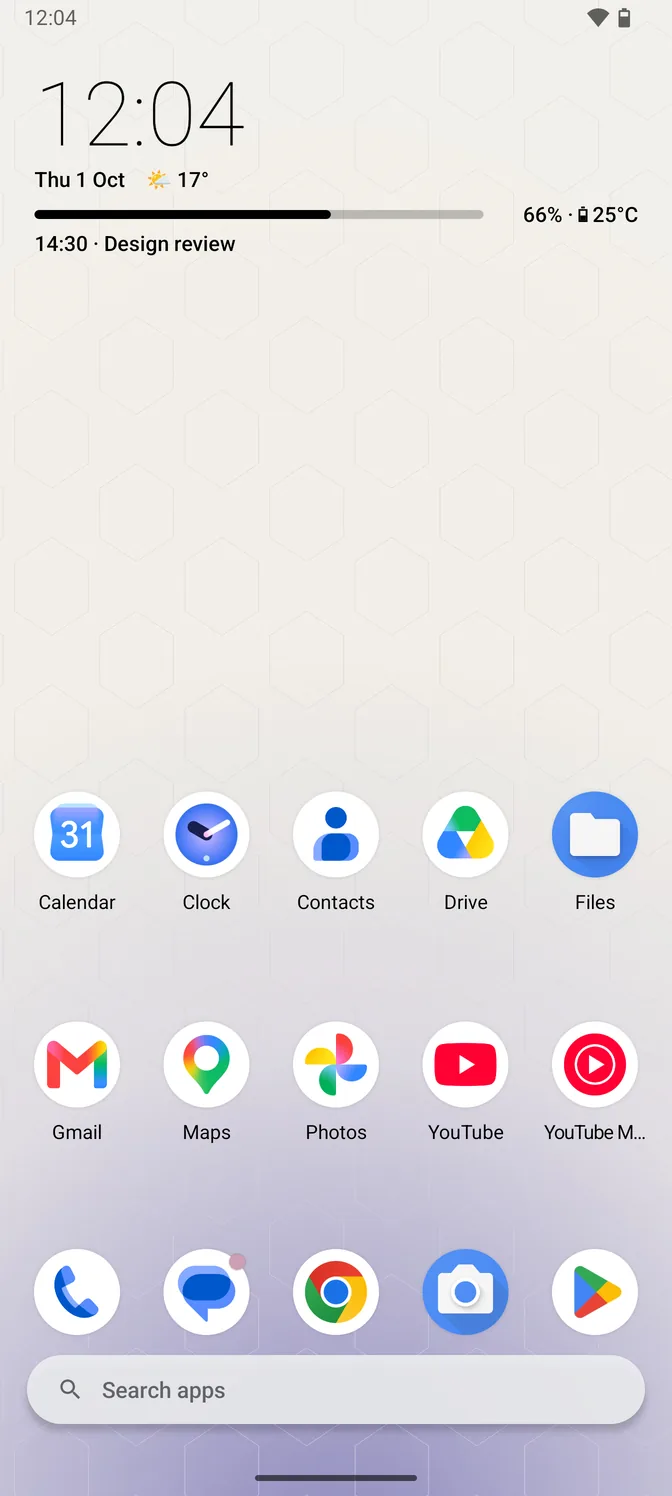
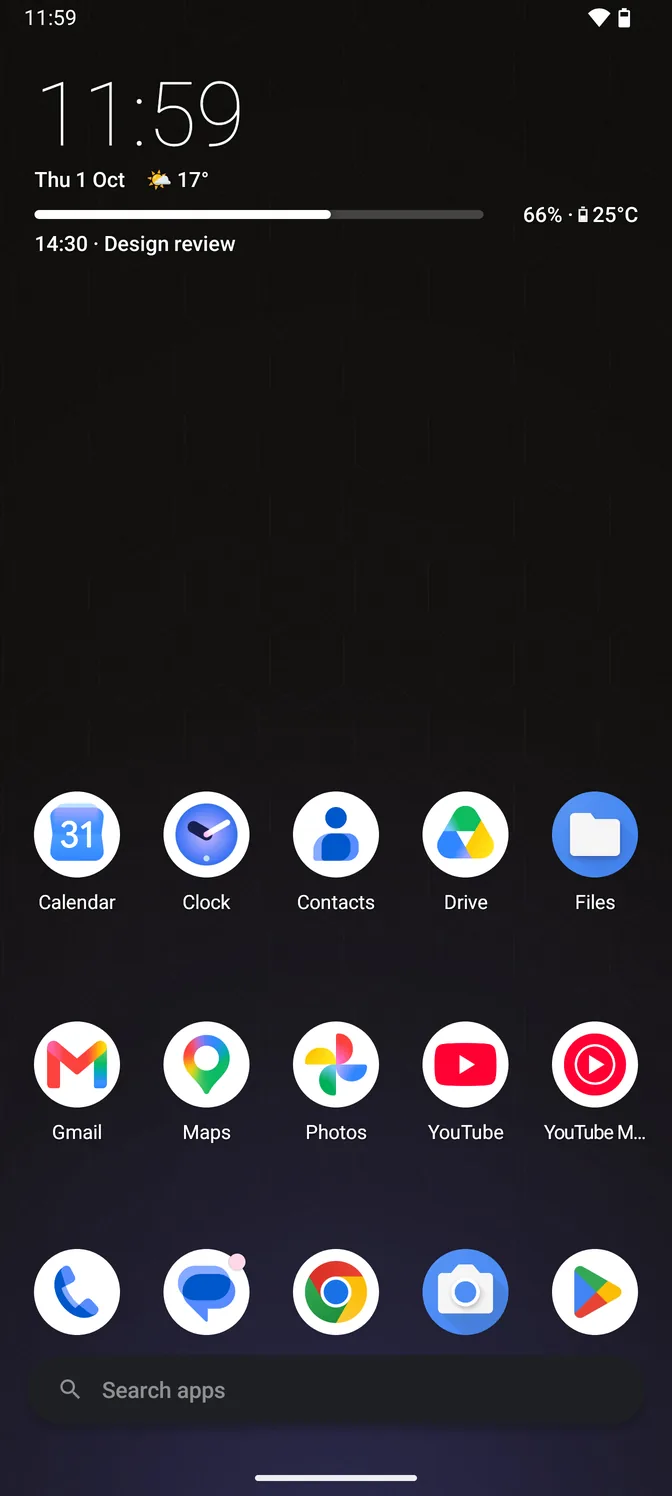
The home screen in the light theme: a large clock in dark type, the date with the current temperature beside it, and the next calendar event, above two rows of app icons, a dock and a search bar, over a pale honeycomb wallpaper. The home screen in the dark theme: a large clock, the date with the current temperature beside it, and the next calendar event, above two rows of app icons, a dock and a search bar, over a near-black honeycomb wallpaper.
Home Clock, date, weather and your next event. Each line can be switched off, and the text turns dark or light to suit the wallpaper.
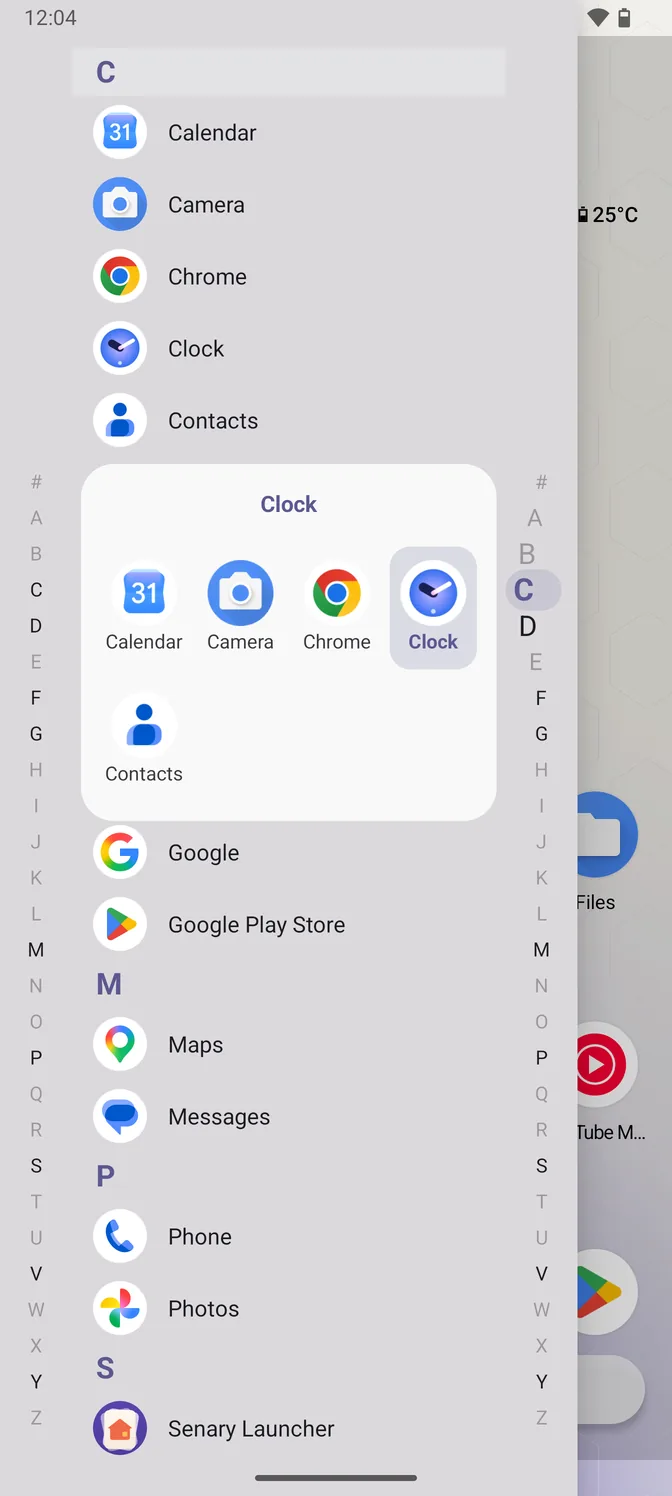
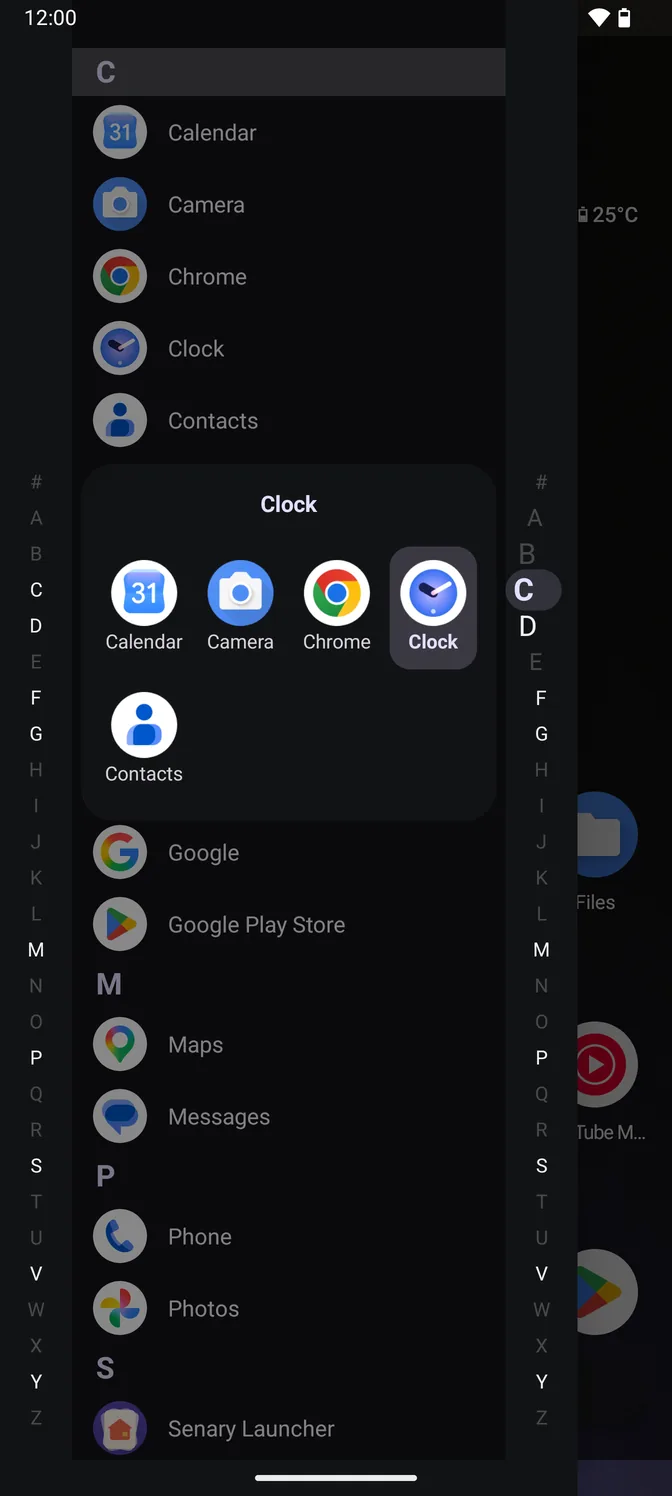
The Quickdrawer in the light theme: an alphabetical app list with an A to Z rail down each side, and a panel showing the five apps filed under C as a grid, with Clock highlighted under the finger. The Quickdrawer in the dark theme: an alphabetical app list with an A to Z rail down each side, and a panel showing the five apps filed under C as a grid, with Clock highlighted under the finger.
Quickdrawer Swipe in from the left for an A–Z list. Hold a letter to see its apps as a grid.
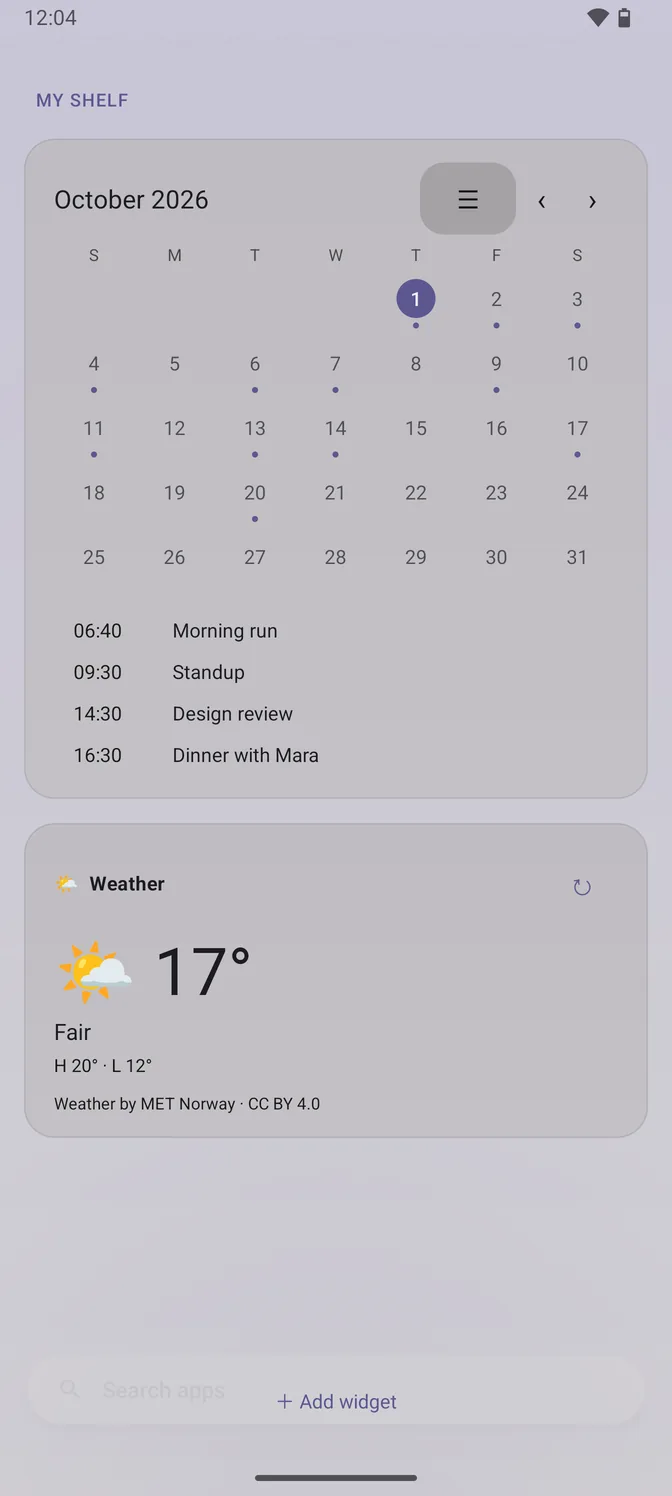
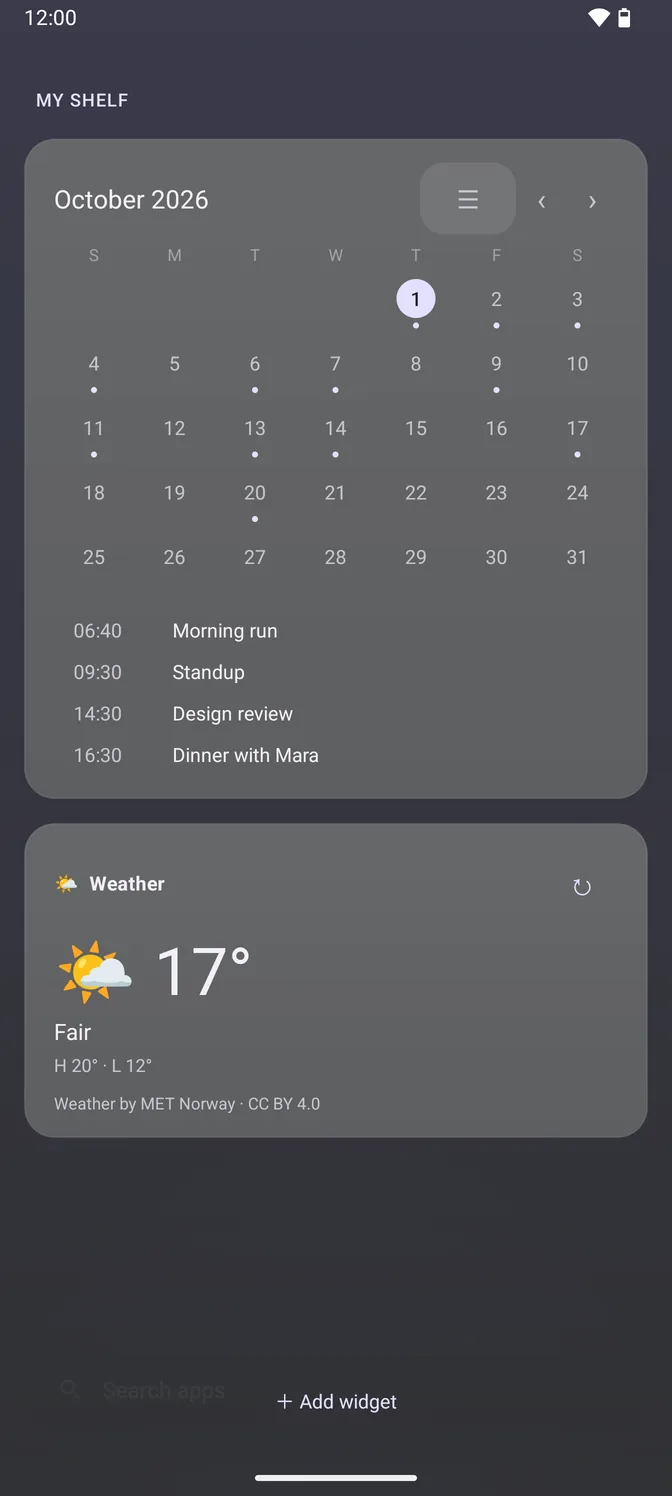
The Shelf in the light theme: a September month calendar with dots on the days that have events, today's four appointments listed underneath, and a weather card reading 19 degrees, partly cloudy. The Shelf in the dark theme: a September month calendar with dots on the days that have events, today's four appointments listed underneath, and a weather card reading 19 degrees, partly cloudy.
Shelf Swipe in from the right: calendar, agenda, weather, media and widgets. Cards you switch off fetch nothing.
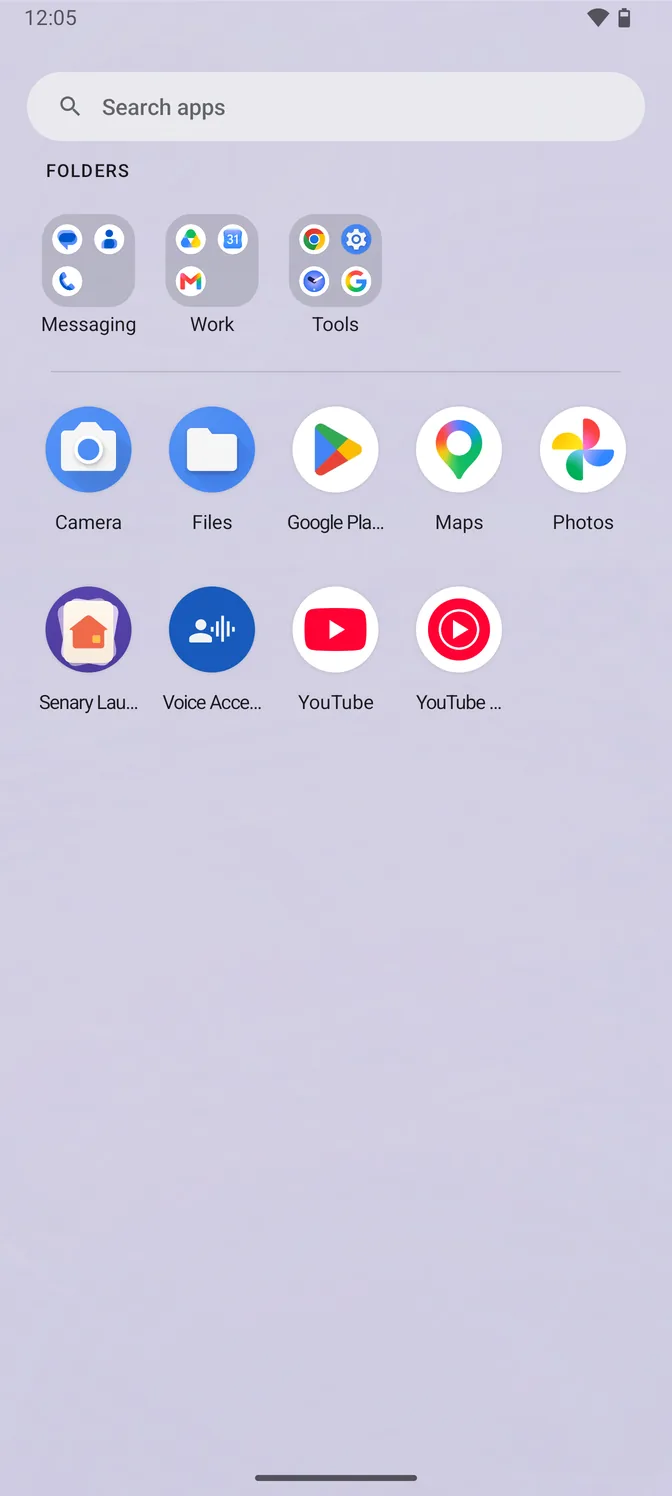
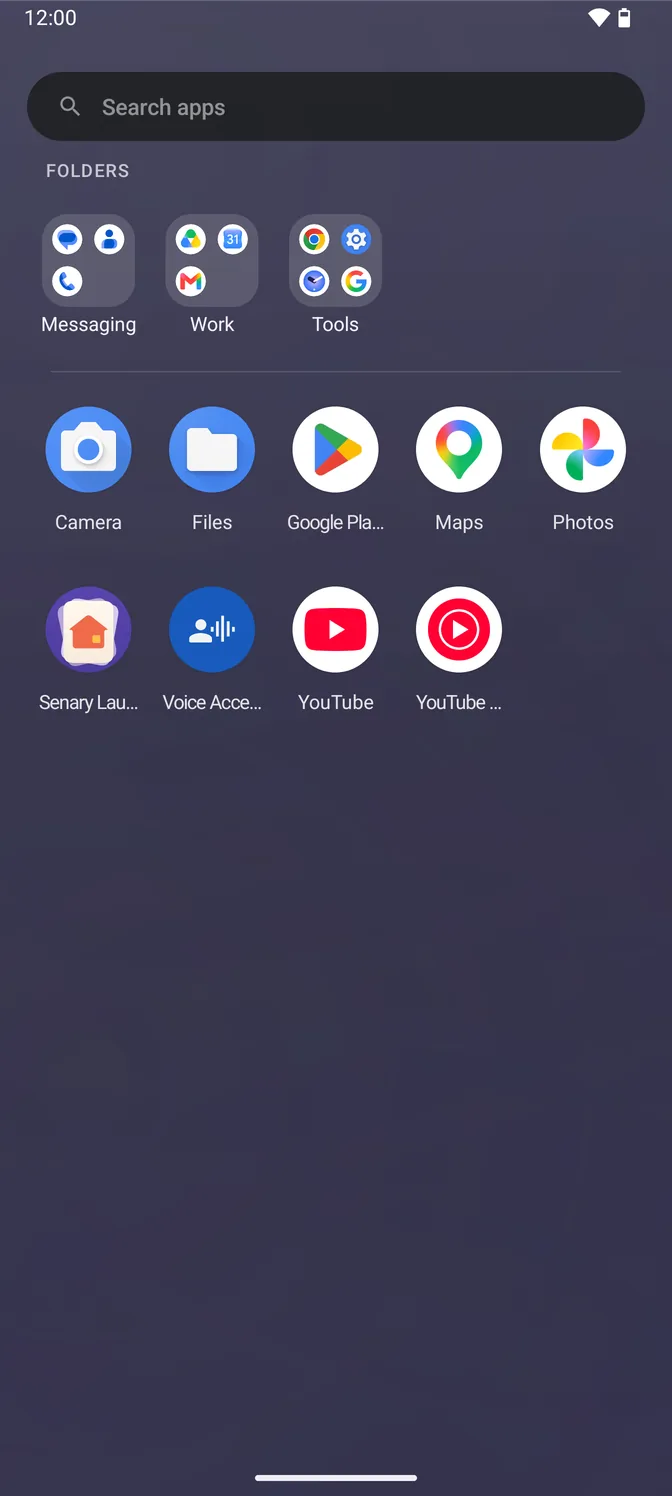
The app drawer in the light theme: a row of three folders called Messaging, Work and Tools, above a short A to Z grid holding the eight apps that are not in one of them. The app drawer in the dark theme: a row of three folders called Messaging, Work and Tools, above a short A to Z grid holding the eight apps that are not in one of them.
Drawer folders Group the drawer by category in one go. Apps in a folder leave the A–Z list.
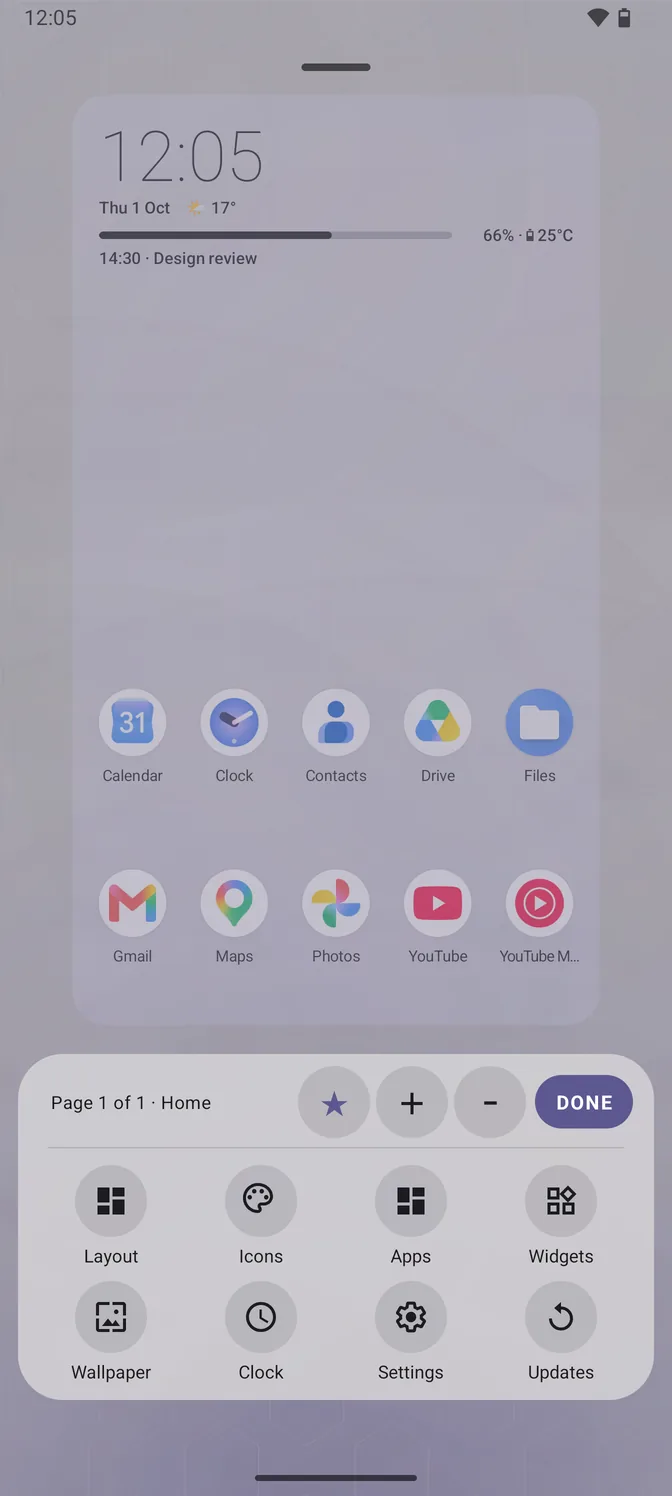
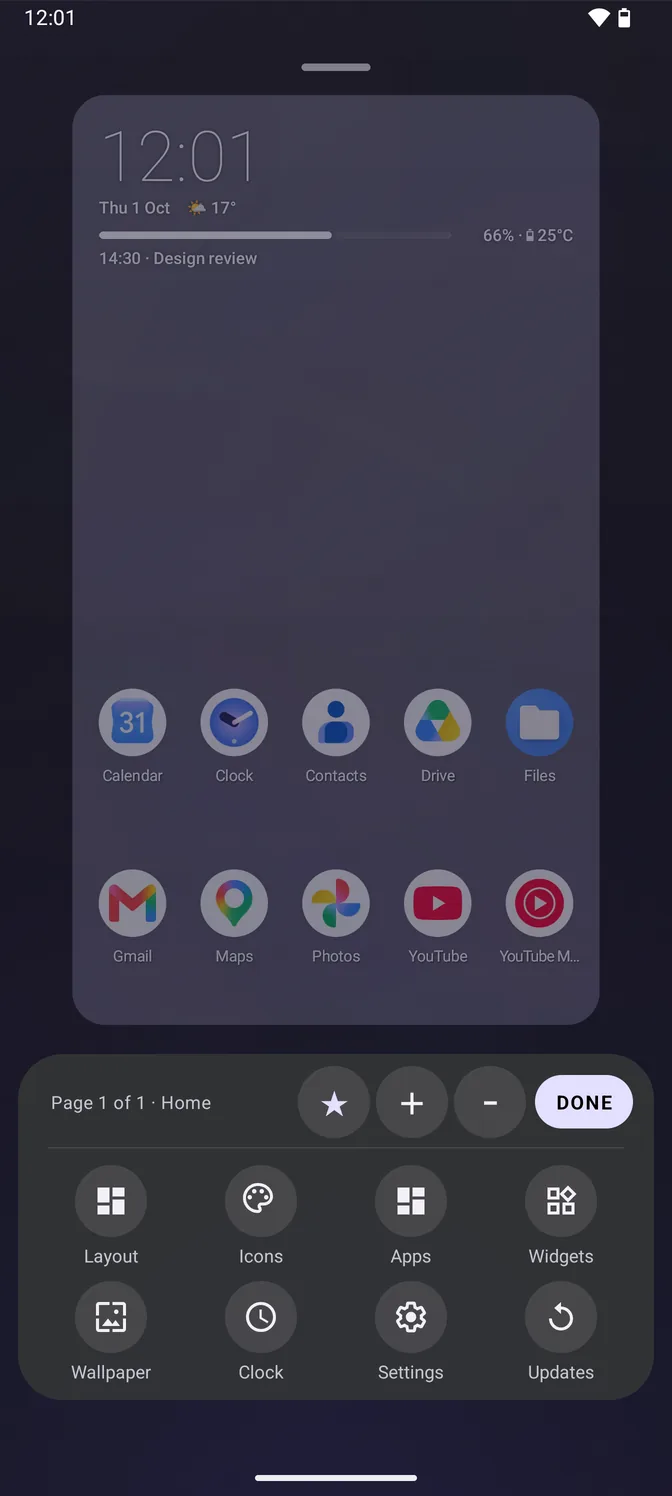
The home editor in the light theme: a live miniature of the home screen above a panel of round buttons labelled Layout, Icons, Apps, Widgets, Wallpaper, Clock, Settings and Updates. The home editor in the dark theme: a live miniature of the home screen above a panel of round buttons labelled Layout, Icons, Apps, Widgets, Wallpaper, Clock, Settings and Updates.
Home editor Long-press the wallpaper to change the grid, icon size, pages and icon pack, with a live preview.

What it does

Senary Launcher icon In development

Senary Launcher

Android 14 and later · built on AOSP Launcher3

My daily driver, on all my Android devices.

  • QuickdrawerA–Z app list from the left edge, with a letter loupe.
  • ShelfCards from the right edge: media, weather, calendar, widgets. News one swipe further.
  • Drawer foldersGroup the drawer by category in one go.
  • Home editorRearrange pages, resize icons, change the clock face.
  • SearchHandles typos, initials and shorthand. Restyle, resize or hide the bar.
  • VoiceHold the search bar, say an app’s name. Runs on the phone, works offline.
  • Twist twiceTwist the phone twice to start voice or toggle the torch. Optional.
  • Double-tap to lockDouble-tap an empty spot to lock. Optional, asks first.
  • Icon packsTheme the home screen, dock and drawer. Preview before applying.
  • Light and darkFollow the system or pick one. Text adapts to the wallpaper.
  • TransitionsParallax, Depth, Cylinder, Sweep or flat.
  • Network logLists every request the app makes.
  • BackupExport your layout to a file. Restore it here or on a new phone.

Against the one you have

What changes when you switch. The right column is what most phones ship with; anything specific to one brand is named.

  Senary Launcher The launcher your phone came with
Reaching an app An edge swipe to an A–Z list, with a grid of a letter's apps under your thumb. Swipe up to a grid, then scroll or type. No letter rail on Pixel or Samsung; some others have one.
Glanceable panel A Shelf on the other edge: calendar, weather, now-playing, news and any widget. A strip at the top of the home screen; widgets take space from your icons.
Organising the drawer Folders in the A–Z list, or the whole drawer grouped by purpose in one pass. No drawer folders on Pixel. Samsung has them, made by hand rather than by category.
Filling the home screen Pick any number of apps in one pass, or put them straight into a folder. Drag them out of the drawer one at a time.
Page transitions Parallax, Depth, Cylinder, Sweep, or flat. Flat on Pixel. Samsung offers a few.
Icon packs Any installed icon pack, previewed on your own home screen first. Not on Pixel. Samsung has its own themes store instead.
Your layout Export it to a file and put it back later. In the phone's cloud backup, not a file you hold.
What it sends Weather and news only, each request listed in the app. No account, no analytics. Tied to the phone's account and its search and feed services.

Checked against Pixel Launcher and Samsung One UI Home, September 2026. If something's out of date, let me know.

What's new

Same list as What's new in the app, newest first. Some versions aren't dated yet.

Version 1.54 changes
  • NewTouch and hold the search bar in the dock, say an app's name and let go to open it. Your speech is turned into text on the phone and nothing is sent anywhere. On phones without speech recognition of their own, or if you choose Senary's own in Settings, Search, a speech model is downloaded once from Google Play.
  • NewTwist your phone back and forth twice on the home screen to say an app's name or to turn the torch on and off. Off until you choose it, in Settings, Gestures.
  • ImprovedThe search bar in the dock lines up exactly with your dock icons and sits a little lower, with more room above it. The search field in the app drawer matches it.
  • NewMake the search bar thinner or thicker, in Settings, Search, Search bar shape. The dock moves to keep the same space above it.
Version 1.42 changes
  • NewDouble-tap an empty spot on the home screen to lock your phone. It asks first, and uses an accessibility service that reads nothing on your screen.
  • NewSenary Launcher now runs on Android 14 as well as 15 and later.
Version 1.313 changes
  • NewA new icon: your home-screen pages, fanned out, with home on the front one.
  • FixedFixed the home screen crashing over and over on some Android 16 phones with a widget on it.
  • NewFar more choices for the shortcut at the end of the search bar: your default apps, such as the calculator or maps, quick controls for internet and volume, actions such as camera, timers and the phone keypad, and some twenty Settings screens. Only what your phone can open is offered.
  • ImprovedClear recent searches is now Clear recent apps, in Privacy and permissions, and it also forgets the apps you opened from the launcher itself, which nothing could clear before.
  • FixedWith three-button navigation, the search bar in the dock sits just above the keyboard instead of floating well clear of it.
  • FixedStarting to close the app drawer and then letting it spring back open no longer brings the keyboard back up.
  • ImprovedThe dock and the search bar sit at almost the same height whichever navigation you use. With gestures that is slightly higher than before. With three buttons it is lower, and the two no longer overlap.
  • NewBefore you type, the search in the dock shows when you last opened each recent app, and scrolls back to older ones. The times need Usage access.
  • ImprovedSearch in the dock and the app drawer copes with typos, initials and shorthand: "instagarm", "gm" for Google Maps, "gmps". Between equally good matches, the app you used last comes first. Typing never launches a guess on its own.
  • ImprovedTyped search results scroll, so you are no longer limited to the first six in the dock or two rows in the drawer.
  • ImprovedTurning off the home search bar now gives its space to the dock, which moves down to fill it.
  • ImprovedThe home screen does less work while it sits idle with notification dots or the charging indicator showing.
  • ImprovedIn the Icons panel, a pack you have picked but not applied now shows Discard instead of Done, so Apply is the only button that keeps it.
Version 1.26 changes
  • FixedThe clock keeps every line you switch on, even at its largest sizes. Its row now grows to make room for them.
  • ImprovedIcons on the 3x3 grid are larger.
  • ImprovedIcon size and text size are now under Icons in the home editor, next to the icon packs.
  • FixedThe app drawer no longer switches to a bright wallpaper colour as it closes.
  • FixedThe search bar no longer flickers at the start of closing the app drawer.
  • FixedFixed rare cases where a dock icon could be lost after using split-screen or changing the display size.
Version 1.177 changes
  • ImprovedThe dock is exactly as wide as you set it in the home editor and keeps your icons where you put them. It no longer widens itself when you drop an app on a full dock, or close up when you take one out. To close a gap, use "Close gaps in the dock", next to the width.
  • FixedThe app drawer no longer opens with an empty strip above the search bar, and the drag handle and panel outline that arrived with it are gone.
  • ImprovedThe app drawer opens and closes more quickly, and reversing part way through no longer jumps.
  • FixedWith an icon pack on, icons are drawn the way the pack drew them instead of being placed inside a white circle. The Quickdrawer was always right; the home screen, dock and app drawer now agree with it.
  • FixedOpening the loupe in a light theme no longer drops a grey block into the panel. The card is lifted instead of the list being darkened.
  • FixedThe dim behind the home search box and behind the widget picker is now weighted for a light theme rather than a dark one.
  • FixedApp names on the home screen follow the same light or dark choice as the clock above them, instead of staying white while the clock turns black.
  • FixedThe weather updates as soon as your location arrives, rather than waiting until you next return to the home screen.
  • FixedThe search bar no longer flashes as it hands over between the dock and the app drawer.
  • FixedThe widget picker closes with the Shelf, instead of still sitting there the next time you swipe it open.
  • FixedAsking for a permission works again after you dismiss the request. If you closed the system prompt without choosing, the launcher took that as a refusal, and from then on tapping the row would only ever send you to the system settings page instead of asking.
  • FixedApp names on the home screen no longer come up dark on a dark wallpaper and stay that way. The launcher was asking about the wallpaper before the phone could answer, then keeping the wrong answer until you changed wallpaper or restarted.
  • FixedThe launcher stops offering to make itself your home app when it already is.
  • FixedThe toggles on the home editor's panel tiles are easier to hit. They were as small on screen as the miniature they are drawn on, which was about a third of the size a control should be.
  • NewThe search bar can take a colour. One slider moves it round the spectrum, and the text and icons on it change to whichever of light or dark reads better, so no setting leaves it hard to read.
  • NewA shortcut can sit at the end of the search bar, pointing at an app or at a place in Settings. It appears in the dock and in the app drawer, and only offers system destinations your phone can actually open.
  • FixedThe search bar shape settings had no heading, sat under the wrong section, and lined up with nothing. It now reads like the rows around it.
  • FixedIcons on the 4x4 grid are the right size for a modern phone. They were being sized from a table that ran out at handsets from 2012, which left them small and the home screen looking sparse.
  • NewSettings can now shape the search bar: rounder or squarer corners and how much of the wallpaper shows through, with the bar itself changing as you drag.
  • FixedThe search bar no longer changes weight as it moves between the dock and the app drawer.
  • ImprovedOn a light wallpaper the home screen text now turns dark, so labels, the clock and the battery line stay readable instead of washing out.
  • NewSearch finds apps by their name in your other languages too, so an app shown in Greek can still be found by typing its English name.
  • New"Open the only match" is now a scale rather than a switch, so search can wait until you have finished typing instead of opening an app mid-word.
  • FixedTapping the search bar in Settings now opens the keyboard.
  • NewNews is its own page now, one swipe past the Shelf, and it can be switched on or off independently. With the Shelf switched off, the same swipe opens News directly.
  • ImprovedSwiping past the Shelf slides it aside rather than covering it, so the two read as pages side by side.
  • FixedA second swipe now counts as a second swipe. Closing a panel and immediately swiping again moves you on rather than waiting for the first animation to finish.
  • ImprovedThe app drawer background now reads as a frosted surface rather than a flat tint. It takes its colours from your wallpaper, sits at the same weight as a real blur, and lets the larger shapes behind it show through.
  • ImprovedThe search bar now slides from the dock into the app drawer in one movement, instead of stepping and settling on the way. It also lines up with the app grid and draws its magnifier at the same size in both places.
  • NewFolders in the app drawer open out of their own tile and sit beside it, so you can still see the rest of the row while one is open.
  • NewA small tick as each icon passes under your finger on the drawer's rows, and as the letter changes in the A to Z list.
  • NewSwitch your default launcher from Advanced settings, without walking through the system menus to find it.
  • ImprovedOpening the app drawer for the first time after a restart no longer stutters.
  • ImprovedNews pictures load faster and use less data: they are now decoded at the size they are shown rather than at full size.
  • FixedClosing a folder on the home screen no longer opens the search bar.
  • FixedThe app menu no longer pops up over an icon while you are dragging it to the home screen.
  • FixedApp drawer rows now have the same space above and below them that columns have either side, so the grid ends where you expect it to.
  • NewTurn the Shelf's calendar and weather cards off, under Settings → Shelf. A card that is off is not fetched either, so switching weather off stops the Shelf asking for it.
  • NewDrag an app out of an open folder to take it out again. It goes back to the A to Z list, or onto another folder, or onto the home screen if you carry it to the home target.
  • ImprovedMaking a folder in the drawer now shows you the folder before you let go: hold an app over another and the two appear together on a folder plate, which then flies up into the Folders row so you can see where it went
  • NewSettings → App drawer → Reset app drawer puts the drawer back the way it started: every folder gone and its apps back in the A to Z list, and the drawer's own settings back to their defaults. Your home screen is not touched.
  • FixedDropping an app onto a drawer folder now shows it in that folder straight away. It was being added correctly, but the folder kept drawing its old contents, so the app looked lost until you opened the folder.
  • FixedAn app in the drawer no longer stays stuck oversized after a folder is made somewhere else in the list
  • NewChoose Light, Dark, or whatever your phone is set to, under Appearance
  • NewA month at a glance on the Shelf, with the days that have something on them marked. Tap a day to see it.
  • NewChoose which calendars the clock and the Shelf read. Nothing chosen means the ones your own calendar app already shows, so other people's subscribed calendars stay out.
  • NewThree clock faces for the home clock, and a Huge size above Extra large
  • NewPull down on the news page to refresh it
  • NewFilter the app picker by category, tick a whole type at once, and add the lot as one folder
  • NewAdd a batch of apps straight to the home screen, or put them in a folder, without dragging them out one at a time
  • NewOne icon size setting that means the same thing on the home screen, in the drawer and on the dock
  • NewEvery editor panel has a Done button, and scrolls when a section is taller than the sheet
  • NewAn Updates tile in the home editor, for checking whether a newer version is out
  • ImprovedWeather now comes from the Norwegian Meteorological Institute, and the launcher asks for a position rather than waiting for another app to have asked first
  • FixedSettings search results scroll clear of the keyboard
  • FixedAn open drawer folder dims what is behind it and sits on a solid panel, instead of the app list reading straight through it, and no longer brings the keyboard up with it
  • FixedPermission rows ask again after restoring a backup onto a fresh install, instead of sending you to the system settings page every time
  • FixedThe weather comes back on its own after being interrupted, instead of leaving the date without a temperature for ten minutes
  • FixedThe app drawer tells the launcher apart from its own settings shortcut
  • ImprovedFrosted panels let the wallpaper show through on a lighter panel rather than blurring it, which is steadier and works on phones and battery-saver modes that turn blur off entirely
  • FixedThe app drawer tabs are no longer blank on phones with a second, cloned profile
  • NewSettings has an App drawer section: turn the two rows above the grid on or off, and set how many icons fit across
  • ImprovedRecently installed and Recently opened are both on from the start, and Recently opened no longer needs Android's usage history to show anything
  • NewTurn on Include updated apps and the top row catches what Play refreshed this morning, not only what you installed
  • NewDrag an app in the drawer onto another to make a folder, or onto a folder to add it to it
  • NewDrag an app up to the search bar and it becomes a way through to the home screen: the drawer steps aside and you drop the icon on the spot you want it
  • NewSend a whole drawer folder to the home screen, name and contents intact, from its long-press menu
  • NewFolders in the app drawer. Settings → App drawer → Make folders groups it by what each app is for; tap a folder to open it, type over its name to rename it, long-press to take it apart.
  • NewA Suggestions row at the top of the app drawer, from how much you have used each app this week. Worked out on your phone, and it needs Android's usage history.
  • NewChoose the mark on the dock search bar: a magnifier, a hexagon, a dot, or none at all
  • [CHANGED] Frosted panels are now a tint rather than a wallpaper blur. The blur only appeared once the screen went still, so it arrived up to two seconds after the panel it belonged to; a tint is there straight away.
  • ImprovedThe Quickdrawer is for scrubbing A to Z. Its search box is gone, since typing in it hid the very rail you opened it for, and app search lives in the dock bar and the drawer.
  • ImprovedThe now playing card stays when you pause, so the play button is still there to resume with, and folds away rather than vanishing when the music really ends
  • ImprovedIn the A–Z preview, sliding your finger clear of the card cancels. You no longer have to retrace the way you came in.
  • FixedTapping the now playing card opens the app that is actually playing, at what it is playing
  • FixedSearching for an app still finds it when your keyboard adds a space after a suggestion
  • FixedApp search offers the best matches rather than the first few it finds, and every place you can search now finds the same apps
Version 1.08 changes
  • NewQuickdrawer: swipe in from the left edge for an A to Z app list, with a magnifier while you scrub the alphabet and drag-to-home
  • NewShelf: swipe in from the right for now playing, weather, a month calendar and your own widgets. Swipe once more for news from sources you choose.
  • NewHome editor: long-press the wallpaper to rearrange pages, resize icons, change the grid and preview icon packs against your own home screen
  • NewSet up your home screen, or add a batch of apps, by picking them from a list instead of dragging them out one at a time
  • NewSearch your apps from the dock, and open the only match without lifting a finger
  • NewBack up your home screen to a file you keep, and restore it on this phone or another one
  • NewNetwork log: every request the launcher makes, listed in Settings, so you can see what leaves your phone
  • NewPage transitions, icon packs, grid size and dock width are all yours to change

How it was built

All notes. Or follow the feed.

Privacy, briefly

Full details, permission by permission: privacy policy.